

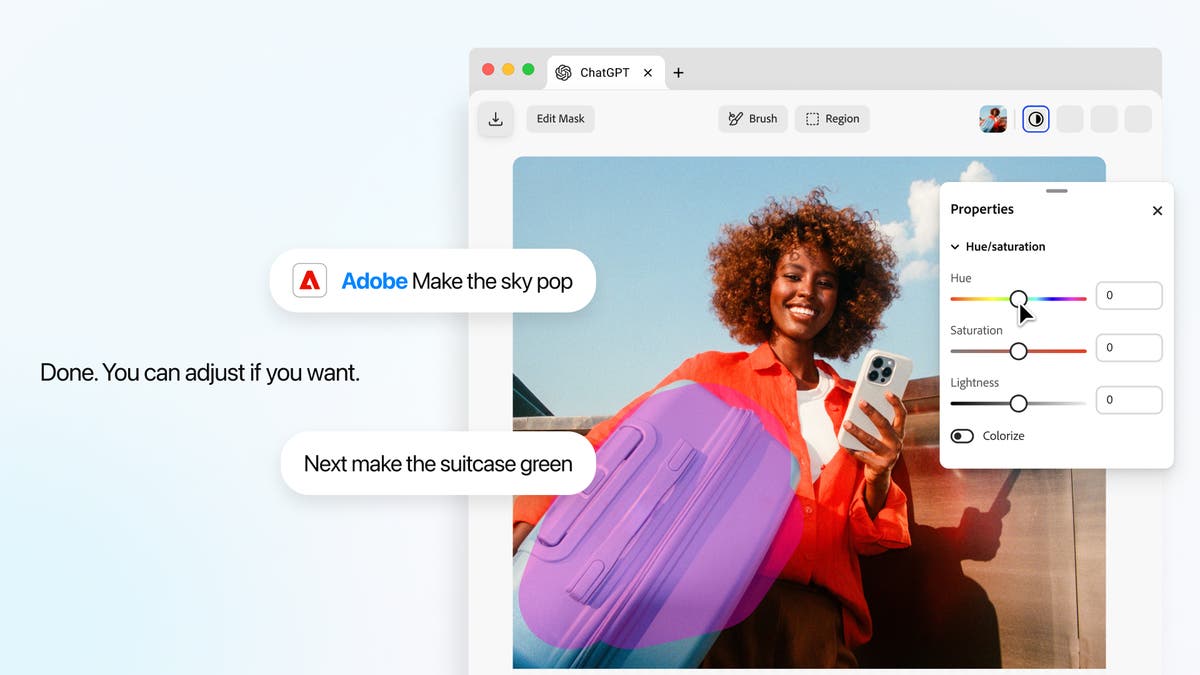
Ask the Adobe plugin in ChatGPT to make a targeted image edit, then fine-tune the result with interactive controls for hue, saturation and more.
Today, alongside OpenAI’s DevDay 2026 announcements, we’re introducing new interactive editing experiences in the Adobe plugin in ChatGPT. These updates give you more hands-on control over images, designs and PDFs, building on the pro-grade creative and productivity tools already available through the plugin.
You can now select part of an image in the interactive editor, ask ChatGPT to use the Adobe plugin to make changes and then fine-tune the result with new controls built for more precise editing. Your edits stay in context as you move between the interactive editor and the conversation. You can also open a PDF and revise text or highlight passages, then send that document context back to ChatGPT to continue the task.
These experiences come to life in side panels in ChatGPT. The new image editor dynamically surfaces controls based on the type of edit you’re trying to make: tell ChatGPT you want to change the color of an object and it’ll surface color controls scoped to just that selection. In addition, the new editor for PDFs lets you make changes directly in your document, so you can move easily from describing the outcome you want to refining it yourself.
– Vibhor Chhabra, product lead for ChatGPT Ecosystem, OpenAI
Fine-tune your photos with Adobe’s interactive editing controls, directly in ChatGPT.
Go from prompting to hands-on editing and back again
The new interactive editors for images and designs (powered by Photoshop and Adobe Express) combine the ease of conversational editing with more precise, hands-on controls over details. Make targeted adjustments to a specific part of an image by selecting an object or brushing over an area. From there, fine-tune adjustments and effects such as hue, saturation, contrast and more, with dynamic sliders and controls.
Say you’re capturing a lifestyle photo of a latte on a coffee table for a social post, and there’s a stray napkin in the shot. Open the image in the side panel, select it with the brush tool, and request a focused change — “remove the napkin from the table.” Once the napkin is removed, you can continue refining the same image. To make the latte pop more, focus on the cup again with the brush tool and ask ChatGPT to use the Adobe plugin to adjust its brightness and contrast. Adobe dynamically surfaces sliders for both, so you can fine-tune the image to get the look you’re going for.
The new interactive editors for images and designs let you move between conversation and hands-on editing all inside ChatGPT.
With this update, you don’t have to choose between prompting and hands-on editing. Your request in ChatGPT uses the Adobe plugin to shape the editing experience, while the adjustments you make in the interactive editor flow back into the conversation as context. Chat and editor stay in sync, so you can move between describing what you want and editing the content yourself without re-explaining your work or uploading the content again. That means you can use conversation when words are the easiest way to get to the outcome you want, then step in with hands-on controls when you need more precision, all in one continuous workflow in ChatGPT.
Open your document in the side panel to edit text, highlight key passages, and use what you select to guide the conversation, all without switching between apps.
Make hands-on edits to PDFs in ChatGPT
You can also get hands-on with PDFs in ChatGPT using Acrobat tools within the Adobe plugin. Open your document in the side panel to revise text or highlight passages yourself. You can see exactly what you’re working with and update or annotate the content in place, without moving into a separate workspace.
Open a PDF with the Adobe plugin in ChatGPT and use Acrobat’s interactive editing tools to revise text directly in your document.
You can also use what you select in a PDF to guide your conversation. Say you’re reviewing a freelance contract. Highlight a paragraph about payment terms and ask ChatGPT to use the Adobe plugin to highlight other sections about payments or invoicing. Acrobat’s highlight tool marks those passages in the document, so you can review the related terms together and check whether they’re consistent.
Together, these new experiences give you more flexibility in how you work with our tools in ChatGPT. That means less time figuring out how to accomplish a task and more time getting your content where you want it.
Adobe precision and control, in the AI chatbot platforms you use
We’re continuing to evolve the Adobe experiences we bring to AI chatbot platforms: in ChatGPT, Claude, and Slack, we recently unified our creative and productivity tools in a single plugin experience, so you can call on one Adobe plugin to move across creative and document workflows in the AI chatbot platforms where you already work.
Our tools are trusted by creative professionals across the industry. As AI chatbot platforms advance, we’re constantly refining how to best provide intuitive precision and control on these surfaces in ways that work best for you. Today’s launch is the latest example, bringing conversation and hands-on editing together in ChatGPT so you have more control when and where you need it.
Start creating with the new Adobe plugin in ChatGPT today
The updates to the Adobe plugin in ChatGPT will start rolling out globally today on ChatGPT web and app.
We’re excited to continue introducing new ways to help you take your work further with Adobe’s tools in ChatGPT, as well as other popular AI chatbot platforms.
Title
Introducing interactive editing controls for the Adobe plugin in ChatGPT
Description
Adobe adds new hands-on editing controls for images, designs, and PDFs to its ChatGPT plugin.
Details
Adobe News
CardDate
2026-09-29
CardImage
CardImageAltText
Introducing interactive editing controls for the Adobe plugin in ChatGPT
ContentType
caas:content-type/blog
Tags
caas:content-type/blog, caas:topic/adobe-news, caas:products/adobe-express, caas:products/photoshop, caas:topic/future-work
