

Table of contents
Phase 1: Govern and identify — inventory, ownership and response authority
Phase 2: Harden and prevent — patching, MFA and secure remote access
Phase 3: Detect and contain — behavioral protection, EDR and segmentation
Phase 4: Roll back and recover — immutable backups and tested restores
Phase 5: Improve — training, exercises and closing the gap
Building ransomware resilience with Acronis Cyber Protect Cloud
Frequently asked questions about how to prevent ransomware damage
Acronis Cyber Protect Cloud
for Service Providers
Try Now
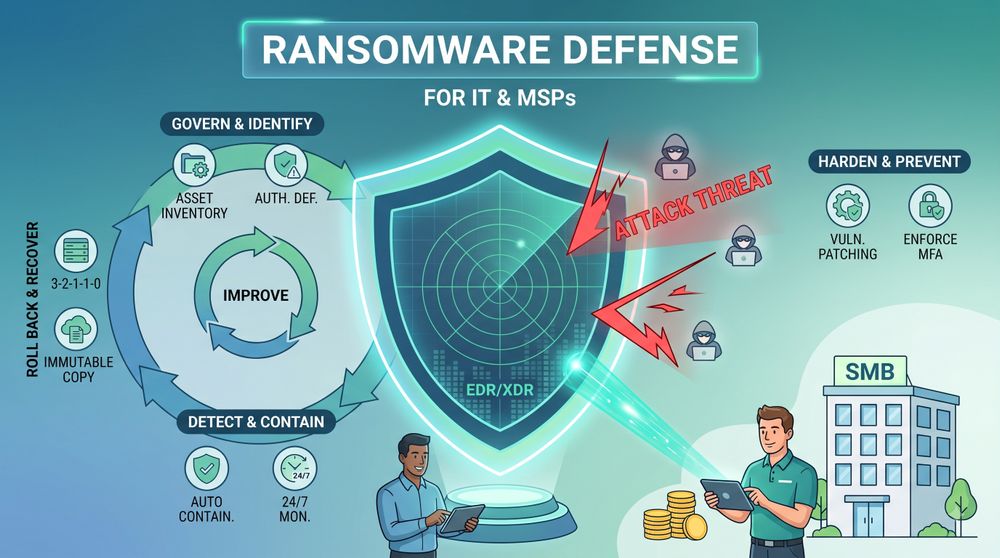
No combination of controls guarantees that ransomware actors will never gain access or cause any impact. What the 12 controls below do is reduce the attacker’s opportunities, accelerate containment and preserve the ability to restore operations without relying on ransom payment. Think of ransomware resilience as a continuous lifecycle rather than a fixed sequence: govern and identify, harden and prevent, detect and contain, roll back and recover, and improve and patch. Inventory, patching, identity control, monitoring, recovery testing and threat detection all operate continuously rather than each running once in a strict order.
The 2026 Verizon DBIR found that vulnerability exploitation became the leading initial breach vector, accounting for 31% of breaches, while ransomware was present in 48% and third-party involvement reached 48% as well. For SMBs specifically, the 2025 DBIR found ransomware in 88% of analyzed breaches, illustrating the disproportionate role ransomware plays in smaller organizations. The steps below map each control to a concrete action and, where applicable, to the Acronis Cyber Protect Cloud capability that delivers it.
Phase 1: Govern and identify — inventory, ownership and response authority
Effective ransomware resilience starts with knowing what you have and who is responsible for what happens next. Skipping this phase means hardening controls you have not actually inventoried and executing an incident response plan nobody has tested.
1. Inventory managed and unmanaged assets, identities and critical services.
You cannot patch, monitor or protect a device, identity or service you have not discovered. Build and maintain an inventory covering physical machines, virtual machines, remote worker endpoints, identities and any critical service that ransomware could disrupt.
In Verizon’s 2025 infostealer analysis, 46% of compromised systems containing potential corporate login data were non-managed devices hosting both personal and business credentials — a reminder that unmanaged personal devices with access to corporate systems are a meaningful inventory blind spot. That figure describes an infostealer credential subset rather than all corporate credential theft, so treat it as a directional signal rather than a precise share of your own environment.
Acronis RMM provides centralized hardware, software and patch visibility across managed workloads, giving MSPs and IT teams a single view of every enrolled endpoint, the software installed and the patches applied or outstanding. Network and asset discovery, device enrollment and inventory of managed endpoints are related but distinct capabilities — do not assume an installed agent automatically identifies every unmanaged device on the network.
2. Define ransomware response authority, RTOs, RPOs and communication procedures.
Decide, before an incident, who has authority to isolate a network segment, how teams communicate when primary systems are encrypted, the escalation path to legal counsel and law enforcement, how to activate a digital forensics and incident response (DFIR) retainer, and the recovery time and recovery point objectives (RTOs and RPOs) for critical systems. Document this alongside your asset inventory so identity and asset governance and incident authority are established together, not improvised after an attack starts.
Phase 2: Harden and prevent — patching, MFA and secure remote access
Vulnerability exploitation and credential compromise are two of the most important ransomware access paths, but hardening must also address phishing, remote access, third parties and previously compromised systems. These risks can be materially reduced through patching, compensating controls, MFA, least privilege and continuous monitoring — not eliminated outright.
3. Patch actively exploited and internet-facing vulnerabilities first.
Prioritize vulnerabilities that are actively exploited, listed in CISA’s Known Exploited Vulnerabilities (KEV) catalog, or present on internet-facing edge systems such as VPNs, firewalls and RMM tools. Apply patches or vendor mitigations within your organization’s emergency remediation window — often 24 to 48 hours for high-risk exposed assets — and use isolation, access restrictions or service disablement when a patch is not yet available. A severity score alone should not set the SLA: a critical but non-exploitable vulnerability can be less urgent than a lower-scoring one under active exploitation.
Mandiant estimated the mean time to exploit at negative seven days in 2025, reflecting exploitation that can begin before a patch is publicly available. Patching alone cannot address pre-disclosure exploitation, so pair it with exposure reduction, detection and compensating controls.
Acronis RMM, available through the Advanced Management pack, automates vulnerability assessment and patch deployment for Windows and more than 320 third-party applications, with configurable schedules and auto-approval rules. Where fail-safe patching is configured, Acronis RMM can create a pre-patch image backup, allowing the workload to be restored if an update causes instability.
4. Enforce phishing-resistant MFA, least privilege and privileged-access controls.
CISA recommends implementing phishing-resistant MFA to the extent possible, particularly for email, VPNs and accounts accessing critical systems. Standard SMS one-time codes and push notifications can be bypassed by prompt-bombing and adversary-in-the-middle (AiTM) attacks. Where feasible, use FIDO2 security keys, platform passkeys, certificate-based authentication or another phishing-resistant method for privileged accounts and any system reachable outside the network perimeter, and pair MFA with least-privilege access so a compromised account cannot reach more than its role requires.
5. Eliminate publicly exposed RDP and secure all remote administration.
Disable native RDP where it is not required. Do not expose RDP directly to the internet — Remote Desktop Protocol remains a primary staging ground for ransomware affiliates after initial credential access, and CISA continues to recommend closing unused RDP ports and placing any necessary RDP behind secure access controls. Route necessary administrative access through a secured remote-access service, VPN or zero-trust gateway with phishing-resistant MFA, least-privilege authorization and session logging.
Acronis RMM provides integrated remote desktop and assistance through the Acronis Cyber Protect Cloud console. Its NEAR protocol uses AES-encrypted communication and supports centralized access, file transfer, session history and recording. Native RDP support remains available where required, but should still be governed according to secure RDP practices — enforcing account lockout after repeated failed attempts, enabling Network Level Authentication and logging sessions to a protected destination.
6. Deploy modern endpoint prevention, behavioral anti-ransomware protection and EDR.
Modern endpoint prevention combines signatures, behavioral analysis, heuristics, reputation and machine learning to block known and previously unseen threats. EDR adds continuous endpoint telemetry, incident correlation, investigation and response capabilities for complex attacks that bypass or disable prevention. For ransomware resilience, the endpoint stack should include modern anti-malware, dedicated behavioral anti-ransomware protection and EDR — these functions are complementary rather than substitutes.
Living-off-the-land (LOTL) techniques, where attackers abuse legitimate administrative tools such as PowerShell, WMI and PsExec to move without triggering signature alerts, are why behavioral coverage matters alongside signatures. Acronis’s Cyberthreats Report H2 2025 identifies PowerShell as the most abused legitimate tool globally and documents rising email, collaboration and ransomware activity, and Mandiant’s M-Trends 2026 independently confirms the shift toward LOTL techniques.
Acronis Active Protection, the behavioral anti-ransomware capability built into Acronis Cyber Protect Cloud, monitors for ransomware-like behavior in real time. Where configured and supported, it can stop the malicious process, revert affected file changes from the Acronis service cache, and alert the administrator. Acronis EDR depends on the behavioral engine or anti-malware protection being enabled, which underscores that EDR and endpoint prevention are complementary layers — not one “behavioral antivirus” product standing in for both.
Phase 3: Detect and contain — behavioral protection, EDR and segmentation
Global median dwell time rose to 14 days in Mandiant’s M-Trends 2026 data, and the median time between initial access and handoff to a secondary threat group fell to 22 seconds in 2025. That does not mean ransomware encryption completes in 22 seconds — Mandiant explains that initial-access brokers increasingly pre-stage tools before handing an environment to the next group. Because access transfer can now be heavily automated, organizations need preventive controls, automated high-confidence containment and continuous monitoring rather than relying exclusively on manual ticket review.
7. Use EDR or XDR with policy-based automated containment and 24/7 monitoring.
Deploy EDR that supports automated or single-click endpoint isolation. Configure autonomous containment for appropriate high-confidence detections and assets, while retaining approval workflows for actions that could create significant operational disruption — automated isolation can interrupt production systems, so it should depend on detection confidence, asset criticality, customer authorization, response policy and availability requirements.
Acronis EDR extends detection, correlation, investigation and response capabilities across the full managed environment from the same console as Active Protection, with automatable response including isolation, targeted rollback, backup-based recovery and patching. Where a managed environment needs continuous coverage beyond business hours, Acronis MDR adds 24/7/365 monitoring, investigation and containment on top of EDR or XDR, with the Advanced service scope adding full remediation, rollback, recovery and closure of the gap that enabled the intrusion.
8. Segment client, identity, management, virtualization and backup control planes.
Network segmentation limits the blast radius when a single endpoint is compromised, but the objective is limiting lateral movement and isolating high-value control planes — not merely keeping ransomware away from a backup server. Segment and separate administrative networks, RMM and management infrastructure, identity systems, hypervisors, backup control planes, OT environments, client tenants and cloud backup credentials.
Mandiant reports that ransomware operators increasingly target backup infrastructure, identity services and virtualization management planes directly, including Akira and Qilin variants observed moving laterally toward hypervisor management consoles. Segmentation alone does not protect cloud backups if backup-management credentials or API tokens are compromised, so credential and access controls for those planes matter as much as network boundaries.
9. Protect security agents, backup services and administrative credentials from tampering.
Ransomware operators frequently attempt to disable security, rollback and backup mechanisms before causing visible damage. Endpoint security and data-protection agents should include tamper resistance, protected configuration and controlled administrative changes — authorized administrators can still change security policy, but self-protection is meant to prevent unauthorized local tampering, not to override legitimate administrative control.
These are related but distinct controls: Active Protection self-protection guards the Acronis agent, its registry records and locally stored backup archives, and protects the master boot record from tampering; local backup protection secures archives stored on the endpoint or local infrastructure; immutable cloud backup protects retained copies at the storage layer; and identity and console protection secures the administrative accounts that could otherwise disable any of the above. Treat them as separate layers rather than one control standing in for all of them.
Phase 4: Roll back and recover — immutable backups and tested restores
CISA notes that ransomware actors commonly try to find and remove accessible backups to make restoration harder unless the ransom is paid. Mandiant’s M-Trends 2026 report documents ransomware groups deploying Akira and Qilin variants specifically targeting backup infrastructure, identity services and hypervisor management consoles during lateral movement. An online backup connected to the production domain is a target, not a safety net by itself.
10. Apply the 3-2-1-1-0 principle with an isolated or immutable recovery copy.
CISA’s advisory AA23-165A recommends three copies of data on two different media types with one copy kept off-site. The current operational standard extends this to 3-2-1-1-0: three copies, two media types, one off-site copy, one offline or immutable copy, and zero unverified backup errors. Offline, air-gapped and immutable copies are different resilience mechanisms — a single copy is not necessarily both offline and immutable depending on architecture, and mature environments may use more than one.
Storage-enforced object lock or WORM can provide stronger separation from the backup application’s administrative plane than an application-level “protected” flag, but the actual guarantee depends on the immutability mode selected, retention configuration, provider architecture, credential scope and administrative break-glass processes — not on any single feature name.
Acronis supports immutable storage intended to prevent protected backups from being encrypted or deleted during the retention period, with tenant-configurable retention windows enforced at the storage layer. For a full implementation walkthrough, see the Acronis immutable backup guide.
11. Test file, system and disaster recovery and validate clean recovery points.
CISA recommends maintaining and regularly testing backup availability and integrity; it does not mandate a universal monthly or quarterly schedule for every organization. Test recovery at a frequency aligned with workload criticality, RTOs, RPOs and regulatory requirements, covering file-level recovery, full-system recovery, application consistency, VM or cloud workload recovery, identity and access to the recovery environment, and disaster-recovery failover where applicable. Document the results and remediate failures before an attack forces the issue under time pressure.
Before committing to a full recovery, validate that the selected recovery point is actually suitable for restoration. Depending on the incident and platform, that may include malware scanning, integrity checks, isolated recovery testing and forensic review — a single scan is not a complete safeguard on its own. Patch the restored workload and reset compromised credentials before returning it to production, and monitor closely afterward. Acronis Cloud Storage includes malware-scanning and immutable-storage capabilities as part of this validation workflow, not as a replacement for it.
Phase 5: Improve — training, exercises and closing the gap
12. Exercise the ransomware response plan, train users to report attacks and patch the exploited entry point after recovery.
Phishing served as the initial access vector in a meaningful share of breaches: the 2025 Verizon DBIR put it at 15%, and IBM’s 2025 Cost of a Data Breach report at 16%. The Acronis Cyberthreats Report H2 2025 found that email attacks increased 16% per organization and 20% per user year over year, with phishing accounting for 83% of email threats and advanced attacks in collaboration applications rising from 12% in 2024 to 31% in 2025 — voice phishing and help-desk social engineering are worth including in training alongside email.
The goal of training is not zero clicks. Recent training was associated with materially higher reporting of simulated phishing — approximately 21%, compared with a 5% baseline for users without recent training. Measure your program on that reporting rate rather than click rate alone. Where email-security tooling supports campaign investigation and remediation, a user report can help administrators identify related messages and remove or quarantine them across affected mailboxes; it is not a guarantee that every copy disappears within minutes.
Test your incident response plan at least twice a year with a documented ransomware scenario. IBM’s 2023 Cost of a Data Breach research found that organizations with high levels of incident response planning and testing had breach costs $1.49 million lower on average and contained breaches 54 days faster than those with low levels or none — figures from that earlier study, not a new 2025 finding, though IBM’s 2025 report continues to recommend testing IR plans, backups, roles and crisis procedures. The mechanism is muscle memory: pre-defined isolation protocols, out-of-band communication channels and pre-authorized containment actions replace ad hoc decision-making during an active ransomware event.
After recovery, patch or otherwise close the vulnerability or gap that enabled the intrusion — testing a plan that never feeds back into hardening repeats the same exposure. For a step-by-step recovery framework, see the Acronis ransomware recovery guide.
Building ransomware resilience with Acronis Cyber Protect Cloud
Ransomware cannot be addressed through one preventive control. Effective resilience combines asset and identity governance, risk-based patching, secure remote access, modern endpoint protection, EDR or XDR, continuous response, protected backups and tested recovery.
Acronis Cyber Protect Cloud enables MSPs to deliver these capabilities through one multitenant operational platform. Acronis RMM reduces exposure through vulnerability assessment, patching and secure remote management; Active Protection and EDR detect and contain endpoint threats; XDR extends visibility across additional attack surfaces; backup and disaster recovery preserve business continuity; and Acronis MDR adds 24/7 expert investigation, remediation, recovery and patching. The result is not a promise that ransomware will never occur — it is a materially lower likelihood of compromise and a faster, controlled path back to normal operations.
Frequently asked questions about how to prevent ransomware damage
What is a ransomware prevention checklist?
A ransomware prevention checklist is a structured set of controls organized across a resilience lifecycle that reduces — but cannot eliminate — an organization’s risk of a successful ransomware attack and its impact. It spans governance and asset identification, environment hardening, detection and containment, backup and recovery, and continuous improvement. Working through all five areas closes the entry points, detection gaps and recovery failures that ransomware operators rely on.
How to protect against ransomware as an MSP?
MSPs face two simultaneous attack surfaces: their own management infrastructure and the client environments they access through RMM and remote desktop tools. CISA’s #StopRansomware Guide specifically flags MSPs as a potential ransomware infection vector for client organizations. In the Acronis Cyber Protect Cloud operating model, the MSP configures and manages protection across client tenants from a multitenant platform: MFA on all remote management consoles, network segmentation between client environments, per-client immutable backup isolation and behavioral endpoint protection across every managed workload. The MSP can operate EDR or XDR internally, and Acronis MDR supplies 24/7 SOC operations when the MSP lacks continuous coverage or specialist expertise in-house. The protected SMB receives the service through its MSP rather than administering the platform directly.
Does this ransomware prevention checklist apply to small businesses?
The controls are identical; the delivery model differs. The 2025 Verizon DBIR found ransomware present in 88% of SMB breaches compared with 39% for large enterprises, reflecting the resource gap in security tooling and in-house expertise many small businesses face. Most small businesses cannot run a dedicated security operations team. Receiving these controls through an MSP using an integrated platform removes the staffing burden without reducing the protection standard. Acronis Cyber Protect Cloud is built for this delivery model: MSPs protecting SMB clients through a single multitenant console.
A Swiss company founded in Singapore in 2003, Acronis has 15 offices worldwide and employees in 60+ countries. Acronis Cyber Platform is available in 26 languages in 150 countries and is used by over 21,000 service providers to protect over 750,000 businesses.
Ransomware protectionMSP cybersecurityCorporate cybersecurityCyber protection for businesses
